InboxPilot

InboxPilot/Features/Waiting for you

Nobody waits unseen

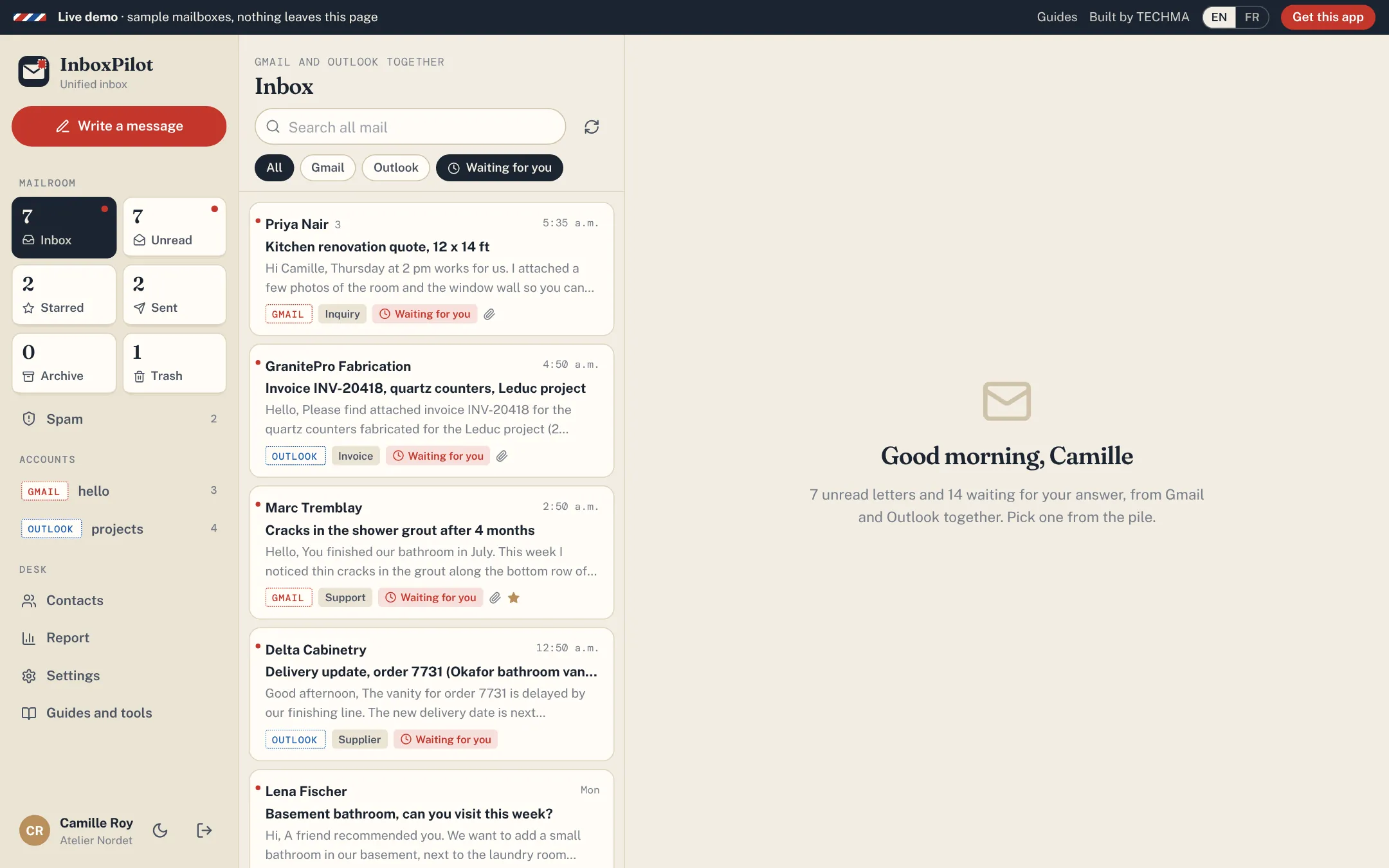
A conversation is waiting for you when the last message is theirs and it asks for something. InboxPilot marks each one and gathers them in one filter.

One click, no account, no email address asked. The mailboxes are samples, and nothing you send leaves the page.

Waiting for youinboxpilot.techma.ai
The Waiting for you filter in the InboxPilot inbox

How waiting is decided

The last message is not yours, the conversation is in the inbox, and what it asks for needs an answer. A receipt, a newsletter or a pickup notice is not counted.

Where you see it

  • A red mark on the conversation in the list
  • A Waiting for you chip at the top of the inbox
  • The list and the count in the report

When it clears

Reply, and the conversation shows Answered. Archive it, and it leaves the inbox and the count.

Questions

Asked before the first call

Can I mark something as handled without replying?

Archive it. It leaves the inbox and the waiting list, and you can bring it back from the archive.

Live demo

Sort a real-looking inbox in two minutes.

InboxPilot is a working application, not a mock-up. Open a conversation, ask the assistant what it wants, draft a reply, send it, and watch the report change.