InboxPilot

InboxPilot/Features/Your rules for the assistant

The assistant follows your rules

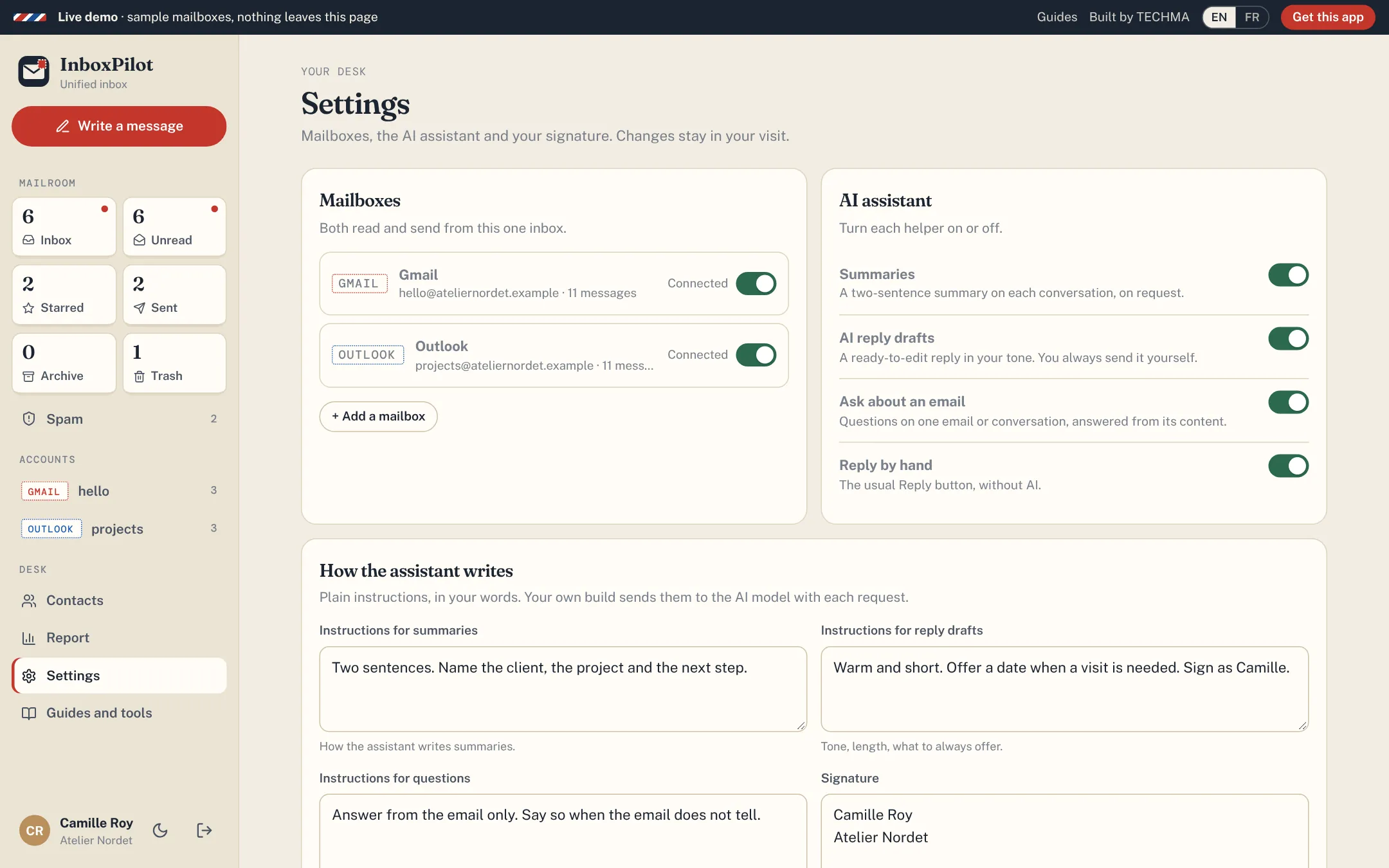
Each AI helper has a switch and its own instructions, written in your words. Change them and the next answers follow.

One click, no account, no email address asked. The mailboxes are samples, and nothing you send leaves the page.

Your rules for the assistantinboxpilot.techma.ai
The InboxPilot settings with mailboxes, switches for each AI helper, instructions and signature

Four switches

  • Summaries, on request
  • AI reply drafts
  • Ask about an email
  • Reply by hand, the usual Reply button

Instructions in plain words

“Two sentences. Name the client, the project and the next step.” “Warm and short. Offer a date when a visit is needed.” “Answer from the email only.” Your own version sends these with each request to the AI model.

Signature and mailboxes

The signature goes under every message you write. Each mailbox can be turned off, which hides its mail until you turn it back on.

Questions

Asked before the first call

Can an administrator lock the instructions?

In a version for a team, yes: the instructions can be set for everyone, with only some people allowed to change them.

Live demo

Sort a real-looking inbox in two minutes.

InboxPilot is a working application, not a mock-up. Open a conversation, ask the assistant what it wants, draft a reply, send it, and watch the report change.